

- **TL;DR**
- Your Job Board Needs XML Feeds to Compete in 2025
- What Is an XML Feed and Why Do Job Boards Use It?
- What is an XML Feed?
- Why Connect JobsPikr to Your Job Board?
- Your Job Board Needs XML Feeds to Compete in 2025
- Step-by-Step Process for Job Backfilling Using XML Feeds
- Field Mapping Guide for XML Feeds
- Why XML Feeds Still Matter in a World Moving to APIs
- Modern Job Board Trends and How XML Feeds Fit In
- Practical Example — A Job Board Scaling from 500 to 20,000 Jobs
- Automate Job Posting with JobsPikr
- Your Job Board Needs XML Feeds to Compete in 2025
- FAQs
**TL;DR**
Updating a job board manually slows down growth. XML feeds allow fully automated syncing of fresh, structured job listings from JobsPikr to your job board software. This guide explains how XML feeds work, how to set up a seamless JobsPikr integration, new best practices for 2025, and how to optimize job import quality for scalability.
Job boards today operate in a highly competitive ecosystem where freshness, accuracy, and volume of job listings directly impact traffic and revenue. As hiring patterns change rapidly, job boards must keep their listings updated in near real time — but doing that manually is nearly impossible.
That’s where XML feeds come in.
For job boards that want to scale efficiently, XML feeds offer a reliable way to import structured job data automatically. When connected to a job data provider like JobsPikr, XML feeds ensure your job board receives new postings daily without human intervention. Instead of spending hours collecting and formatting jobs, you can focus on improving user experience, revenue channels, and employer relationships.
This 2025 refresh updates the original article with clearer explanations, a deeper technical breakdown, modern examples, enhanced use cases, and new sections reflecting current trends in job board automation.
You’ll learn:
- What XML feeds are and why job boards rely on them
- How to integrate JobsPikr XML feeds into your platform
- Best-practice filters to get the cleanest possible job data
- How to avoid common job board scaling problems
- 2025 automation trends and examples
- FAQs to improve topical completeness
And much more.
Let’s begin with the basics.
Your Job Board Needs XML Feeds to Compete in 2025
Deliver high-quality, updated listings every day using JobsPikr’s automated xml feeds.
Reach out now and we’ll help you set up your first feed.
What Is an XML Feed and Why Do Job Boards Use It?
For job boards looking to scale, keeping the job board updated with the latest job postings could be time-consuming. Having the backing of a strong SaaS product like JobsPikr ensures that the daily process of web crawling posting is automated, leaving your job board with fewer overheads and more opportunities to scale. Automate job posting to your job board with JobsPikr.
Most job board software – like WordPress All-Import, SmartJobBoard for example – allow the use of XML Feeds to connect to external job sources. Setting up this integration is simple.
What is an XML Feed?
An XML Feed is a standardized way to structure and distribute job listings across different platforms, allowing job boards to automatically receive and display job postings from external sources. XML (eXtensible Markup Language) is commonly used because it is both machine-readable and human-readable, making it easy for job board software to parse and import data.
In the context of job boards, an XML Job Feed acts as a bridge between a job data provider, like JobsPikr, and the job board itself. This feed contains various job-related data fields, such as job titles, descriptions, locations, salaries, and application URLs. By integrating an XML feed into your job board, you can automate the process of importing and updating job listings, ensuring that your board remains current with minimal manual effort.
Most job board software platforms, such as WordPress All-Import and SmartJobBoard, support XML feeds, making it straightforward to connect with external job sources. With XML Job Feeds, the integration process becomes seamless, allowing job boards to scale efficiently by regularly updating their listings without the need for constant manual input.
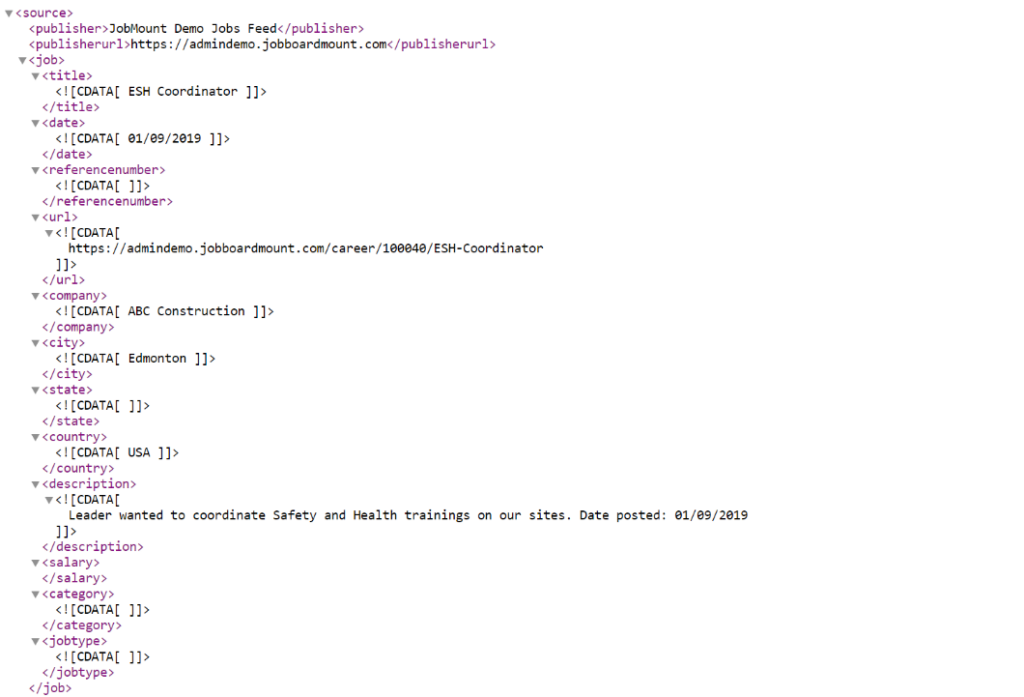
Image Source: JobBoardMount
Why Connect JobsPikr to Your Job Board?
JobsPikr automates the entire process of:
- Crawling the web
- Collecting fresh job listings
- Cleaning and deduplicating them
- Structuring them into standardized fields
- Delivering them daily through an XML feed
This means your job board receives a reliable stream of updated job listings — with zero manual scraping, formatting, or API maintenance required.
The benefit?
You scale supply (job listings) without scaling effort.
Businesses use JobsPikr XML feeds for:
- Backfilling new job boards
- Expanding into new industries or geographies
- Increasing daily job volume
- Improving SEO by constantly updating listings
- Building niche job marketplaces
Let’s walk through the setup.
Your Job Board Needs XML Feeds to Compete in 2025
Deliver high-quality, updated listings every day using JobsPikr’s automated xml feeds.
Reach out now and we’ll help you set up your first feed.
Step-by-Step Process for Job Backfilling Using XML Feeds
- Login to JobsPikr and search for jobs that are relevant to your niche. Make sure your queries are made strict at this point – to let the integration with your job board software set up properly. While searching for jobs, we would recommend using the following additional filters.
- HTML Job Description Availability – To render job descriptions along with the relevant styling and formatting, it is important to have the HTML version of the job description. Though over 90% of jobs we provide tend to have it, it is advisable to enable the filter to make sure plain text data is not being sent to your job board.
- Exclude Duplicates – This ensures that same job collected from different sources are not sent to your job board.
- Apply URL Availability – Assuming you’d not have a mechanism to collect applicant details and pass over to the hiring company, it is best to send your users to the actual career pages of the companies to apply for a given job. In case you do not wish to use Apply_URL, you may go with the URL field itself, which will send users to other job boards like Monster, CareerBuilder etc. Though it would work fine, it is probably not the ideal way to handle it.
- Contact Data Availability – Most job board software would require a contact email while adding a job. This is not mandatory, and you may also choose to use a default email address here. However, it is advisable.
- Salary Data Availability – We provide salary information as currency, min, max, and time unit values. This again, is not mandatory, but if you wish to add jobs that contain salary information, the salary filter would come in handy.
2. Once you’ve played around with the search queries and are happy with the data being returned, save the query. Give any name that is easier to recall while saving the query.
3. Head over to the “Data Download” menu on the left hand side menu and click on “Export Data”.
4. Choose the “Add New Export” option. Select the query you’ve saved and choose the XML Feed option.
- All XML Feed options are updated daily. That is, newly found jobs matching your search criteria will be bundled and made available daily.
- You may choose to set an upper limit to the number of jobs you want to add per day. Else, please leave it as zero and “save” the export.
5. Return to the Export Data page and you’ll find the list of Scheduled Data Exports listing. The “Feed URL”, under the Account Name column is the XML Feed.
- Please note that it might take a few seconds to bundle the XML feed for the first time and till that time, the URL may return a 404 error message. If that happens, you may refresh the page after a while and check.
Now that you have generated the XML Feed, you will be able to use it on your job board software to start importing job data or automate job posting . Please note that once the first set of jobs are bundled, the JobsPikr system will automatically update the XML feed with newly found jobs matching your search criteria on a daily basis. While importing data, your job board software may prompt you to map the fields to interpret data coming in from JobsPikr feeds. Some of the common fields that should be used while mapping are as follows.
Field Mapping Guide for XML Feeds
Your job board may ask you to map incoming XML fields to its internal fields.
Below is the updated 2025 best-practice mapping table:
| Data | JobsPikr Field Name | Second-best Option |
| Employer Name | company_name | |
| Job Title | job_title | inferred_job_title |
| Job Description | html_job_description | job_description |
| Job Posting Date | post_date | |
| Job Type | job_type | |
| Category | inferred_department_name | category |
| Apply URL | apply_url | url |
| Expiration Date | valid_through | |
| City | inferred_city | city |
| State | inferred_state | state |
| Country | inferred_country | country |
| Minimum Salary | inferred_salary_from | |
| Maximum Salary | inferred_salary_to | |
| Salary time unit | inferred_salary_time_unit | |
| Salary currency | inferred_salary_currency | |
| Remote job | is_remote |
Correct mapping ensures clean display and fewer rejected imports.
Why XML Feeds Still Matter in a World Moving to APIs
Many platforms now offer API-based job ingestion, so why do XML feeds remain so widely used?
1. Stability and backward compatibility
APIs evolve quickly; XML feed structures rarely change. Job boards avoid breaking changes by using feeds.
2. Easier troubleshooting
You can simply open an XML feed in a browser and inspect the data. APIs require authentication, rate limits, and version handling.
3. Lower engineering overhead
Most job boards prefer plug-and-play integration instead of custom API work.
4. Ideal for bulk importing
XML feeds allow thousands of jobs to be ingested at once without pagination or throttling.
5. SEO advantages through constant updates
Search engines prioritize platforms with fresh listings. XML feeds ensure daily content updates without content duplication issues.
In short: XML feeds remain the backbone of scalable job board operations in 2025.
Modern Job Board Trends and How XML Feeds Fit In
2025 job boards are no longer just job aggregators. They’re marketplace ecosystems involving AI, personalization, and content automation.
Here’s how XML feeds fit into modern trends:
Trend 1: AI-driven recommendations
AI models require large, structured datasets. XML feeds deliver consistent data that improves relevance scoring and keyword matching.
Trend 2: Niche job boards
As niche job markets explode (green jobs, AI roles, healthcare micro-specialties), XML feeds help curate highly specific collections of roles.
Trend 3: Real-time job freshness
Users abandon platforms that show outdated listings. XML feeds ensure daily refresh cycles.
Trend 4: SEO-powered traffic growth
Search engines reward dynamic pages. Daily job imports strengthen:
- Crawl frequency
- Index freshness
- Long-tail keyword visibility
Trend 5: Monetization expansion
Clean job data supports:
- Paid employer listings
- Sponsorships
- Programmatic advertising
- Career content monetization
All fueled by consistent job supply.
Practical Example — A Job Board Scaling from 500 to 20,000 Jobs
A niche nursing job board using JobsPikr XML feeds was able to:
- Add 1,500+ new listings daily
- Improve organic traffic by 40% month-over-month
- Reduce manual posting time by 95%
- Increase user session time because listings were always fresh
- Monetize with targeted employer postings
The success came from:
- Strict filtering
- Clean HTML descriptions
- Consistent daily feed updates
- Accurate field mapping
- Avoiding duplicates
This demonstrates how XML feeds directly impact growth, revenue, and operational efficiency.
Automate Job Posting with JobsPikr
Typically, JobsPikr’s Growth Plan – which gives access to all the required filters and ample download credits – is best suited for XML feed integrations like the one mentioned above. Easily, automate job posting to your job board. You’re also free to set up as many saved queries and integrations as needed. Why wait for more? Sign up for a FREE trial today!
Your Job Board Needs XML Feeds to Compete in 2025
Deliver high-quality, updated listings every day using JobsPikr’s automated xml feeds.
Reach out now and we’ll help you set up your first feed.
FAQs
What makes XML feeds better than API ingestion for job boards?
XML feeds require no engineering setup, handle bulk data more smoothly, and are compatible with almost every job board CMS. APIs are great for custom platforms but require maintenance and versioning.
How often does JobsPikr update the XML feed?
XML feeds refresh daily, bundling every new job that matches your saved query filters.
Can I choose which fields appear in my XML feed?
JobsPikr provides a standardized structure. However, you can control what appears in the feed using filters: HTML descriptions, salary data, duplicates, location precision, etc.
What if my job board requires JSON instead of XML?
JobsPikr supports multiple export formats, but XML remains the most widely compatible. JSON exports can be configured depending on your plan.
Do I need technical experience to set up an XML feed?
No. The process involves saving a query and generating an export. Mapping fields inside your job board software is usually done via dropdown menus.
Can XML feeds help with SEO?
Yes. Regularly updated job pages improve crawl frequency and long-tail keyword rankings because search engines prioritize fresh content.
Can I import jobs from multiple XML feeds at once?
Yes. Many job boards allow multiple feed imports for different industries or geographies. JobsPikr supports unlimited saved queries and exports on most plans.