

- The Quick Guide to Recruiting Automation with JobsPikr
- Why Raw Job Data Is Only Half the Picture
- Smarter ATS Integration Starts With Smarter Job Data
- What JobsPikr Actually Gives You (And Why It Matters for Recruiting Automation)
- How to Connect JobsPikr to Your ATS: A Step-by-Step ATS Integration Guide
- How to Integrate JobsPikr with Your CRM for Smarter Talent Pipeline Management
- Ready to Turn JobsPikr Into Your Recruiting Automation Engine?
- Real Recruiting Automation Use Cases That Show What This Integration Actually Does
- Common HR Tech Integration Mistakes and How to Avoid Them
- Ready to Turn JobsPikr Into Your Recruiting Automation Engine?
- From Data Feed to Workforce Intelligence Infrastructure: What a Successful JobsPikr Integration Actually Looks Like
- Wrapping Up: Why Recruiting Automation Starts with the Right Integration
- Ready to Turn JobsPikr Into Your Recruiting Automation Engine?
- Frequently Asked Questions About Integrating JobsPikr for Recruiting Automation
The Quick Guide to Recruiting Automation with JobsPikr
If your job market data isn’t living inside your ATS or CRM, it’s not really working for you.
What you’ll take away from this guide:
- JobsPikr’s API connects directly to major ATS platforms like Greenhouse, Lever, Workday, and iCIMS, and to your CRM, putting live labor market data where recruiting decisions actually get made.
- You’ll get a step-by-step walkthrough of the integration process, from authentication to real workflow use cases like auto-enriching candidate records and triggering sourcing alerts when role demand spikes.
- We’ll cover the technical requirements, the common mistakes teams make during setup, and how to avoid them.
Once this integration is in place, JobsPikr stops being a background data source and becomes the intelligence layer running through your entire recruiting workflow.
Why Raw Job Data Is Only Half the Picture
Most recruiting teams are not short on data. They have LinkedIn reports, compensation surveys, ATS dashboards, and market intelligence tools. What they are short on is data that shows up at the right moment, in the right place, without someone having to go look for it.
That is the gap this guide is about.
When job market data sits in a separate tool or a weekly export, it gets checked occasionally and acted on rarely. But when that same data is embedded inside your ATS or CRM, it becomes part of how your team works every day. A recruiter opening a req in Greenhouse sees live comp benchmarks. A sourcer in your CRM sees a spike in demand for a role they are actively filling. No extra tab, no separate login, no lag.
According to the U.S. Bureau of Labor Statistics, the average time to fill a position across industries sits around 36 days. A significant portion of that delay comes from decisions that could have been made faster with better market context available at the right moment.
JobsPikr is a real-time job data platform that aggregates millions of active job postings globally. This guide will walk you through exactly how to plug that data into the HR tech stack you already have, and what becomes possible once you do.
Smarter ATS Integration Starts With Smarter Job Data
Your ATS is only as good as the intelligence running through it. See what JobsPikr looks like when it is live inside your recruiting workflow.
What JobsPikr Actually Gives You (And Why It Matters for Recruiting Automation)
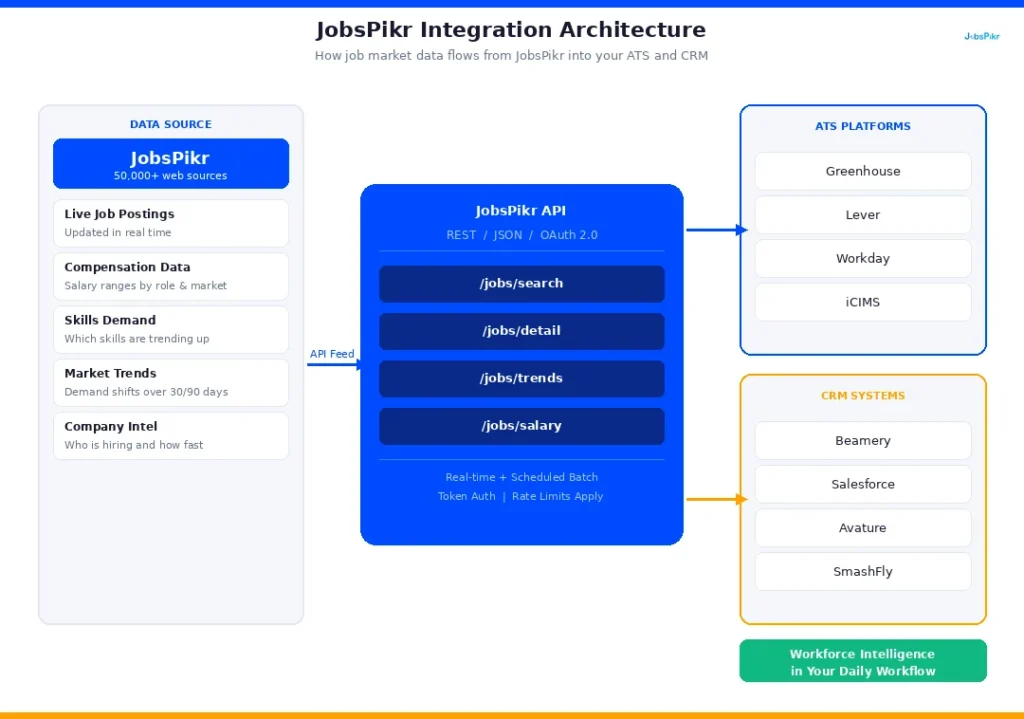
Most job data tools give you a number. JobsPikr gives you context. There is a meaningful difference between knowing that demand for a role exists and knowing where that demand is coming from, how fast it is growing, and what the market is paying for it right now.
JobsPikr aggregates structured job posting data from across the web, updated in near real time. At the time of writing, the platform tracks data from over 50,000 sources globally, covering millions of active job listings across industries, geographies, and job functions. That data is not just a raw feed. It is cleaned, structured, and queryable, which is what makes it actually usable inside an ATS or CRM workflow.
Job Data Fields and Coverage in JobsPikr
Each job posting that comes through JobsPikr carries structured fields including job title, company name, location, posted date, required skills, experience level, and compensation data where available. At an aggregate level, you can query trends by role, region, skill set, or company, which is where the workforce intelligence use cases start to open up.
API, Data Feeds, and Integration Delivery Methods
JobsPikr delivers data through three main channels. The API is the most flexible option and the one most relevant for ATS and CRM integration. It lets you query live job data programmatically and push it directly into your existing tools. Data feeds are available for teams that prefer scheduled batch delivery rather than live API calls. And for teams building more custom pipelines, JobsPikr also supports direct data partnerships with configurable delivery formats.
According to Aptitude Research, 62% of companies say that improving the quality of data in their recruiting process is a top priority. The integration steps in the next sections are exactly how you get there.
How to Connect JobsPikr to Your ATS: A Step-by-Step ATS Integration Guide
This is where recruiting automation starts to get practical. Connecting JobsPikr to your ATS means your recruiters get live market context inside the tool they are already in all day. Here is how to set it up.
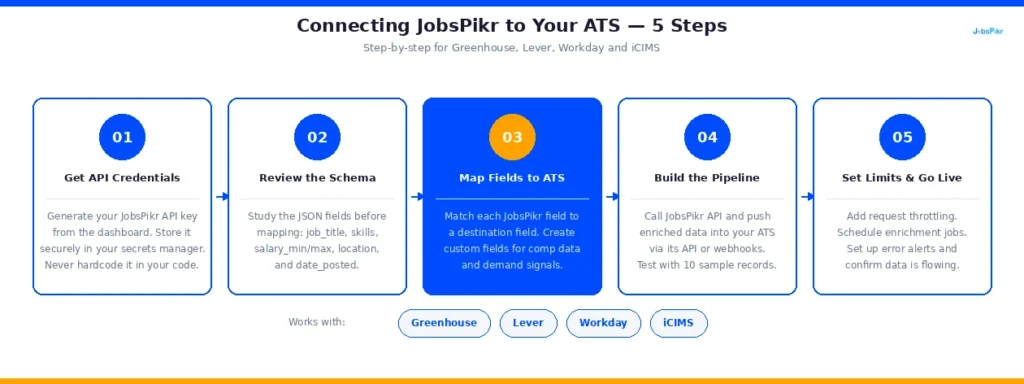
Step 1: Get your JobsPikr API credentials
Before anything else, you need API access. Log in to your JobsPikr account, navigate to the API section of your dashboard, and generate your API key. This key is what authenticates every request your ATS makes to JobsPikr’s servers. Keep it secure and do not hardcode it into any client-side code.
JobsPikr’s API uses token-based authentication. Every request you send will include this key in the request header, like this: Authorization: Bearer YOUR_API_KEY
Step 2: Understand the data schema before you map anything
A common mistake teams make is jumping straight to the integration without understanding what fields are coming in. JobsPikr returns job data in JSON format. The core fields you will be mapping into your ATS include job title, company name, location (city, state, country), posted date, job description, required skills, experience level, employment type, and salary range, where available.
Spend time here. The cleaner your field mapping is upfront, the less cleanup you will do later.
Step 3: Connect to your ATS platform
The connection process varies slightly depending on which ATS you are using, but the core logic is the same across all of them. You are essentially building a data pipeline that pulls from JobsPikr’s API and writes into your ATS via its own API or webhook system.
For Greenhouse, use the Harvest API on the Greenhouse side to create or update job records. You will call JobsPikr’s job search endpoint to pull relevant market data, then use Greenhouse’s POST endpoints to push enriched data into job records or candidate profiles.
For Lever, the process is similar. Lever’s API allows you to update opportunity records with custom fields. Map JobsPikr’s compensation data and demand data into those custom fields so recruiters see market context directly inside each candidate opportunity.
For Workday, integration typically goes through Workday’s Enterprise Interface Builder or their REST API framework. Given Workday’s complexity, most teams route this through a middleware layer like MuleSoft or Boomi rather than building a direct connection.
For iCIMS, use their Connect integration platform or their REST API to push JobsPikr data into job requisitions or candidate records. iCIMS has solid documentation on external data enrichment workflows that maps well to what JobsPikr delivers.
Step 4: Set your query parameters
You do not want every job posting JobsPikr tracks flowing into your ATS. You want targeted, relevant data. Use JobsPikr’s filtering parameters to narrow your queries by job title, location, date range, and industry. A well-scoped query keeps your data clean and your ATS from getting cluttered with irrelevant records.
Step 5: Handle rate limits properly
JobsPikr’s API has rate limits in place, and hitting them mid-workflow is a common and avoidable problem. Check your plan’s rate limit documentation and build in request throttling on your end. For most ATS integration use cases, scheduling data pulls at set intervals (hourly or daily, depending on how live you need the data) works better than continuous polling and keeps you well within limits.
According to Bersin by Deloitte, organizations with mature HR tech integration practices see up to 40% improvements in recruiter productivity. Getting this foundation right is what makes that kind of outcome possible.
How to Integrate JobsPikr with Your CRM for Smarter Talent Pipeline Management
If your ATS is where candidates live during an active hiring process, your CRM is where relationships live before that process even starts. It is where you are nurturing passive candidates, tracking talent pools, and building pipelines for roles that do not exist yet but will. That is exactly why plugging JobsPikr data into your CRM is such a high-value move for recruiting automation.
When your CRM has live labor market context attached to candidate records, your sourcers stop working from static lists and start working from intelligence. They know which talent pools are heating up, which skills are getting harder to find, and which candidates in their pipeline are likely fielding more inbound interest than they were six months ago.
Here is how to set it up.
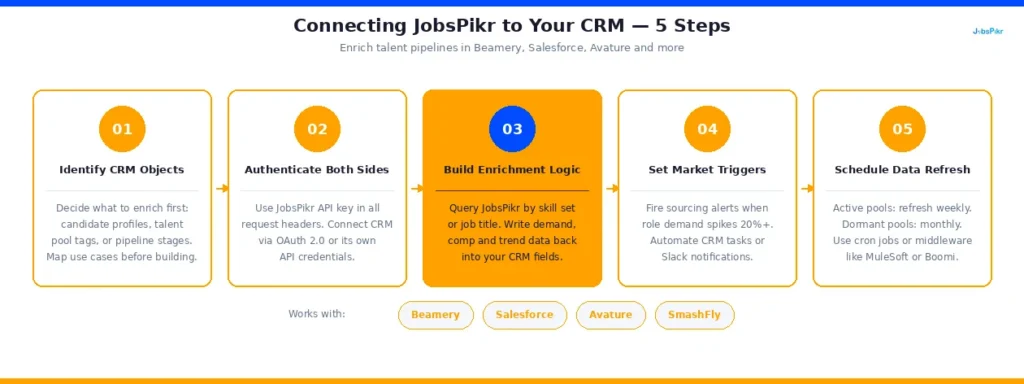
Step 1: Identify which CRM objects you are enriching
Before writing a single line of code, get clear on what you are actually trying to enrich. In most recruiting CRMs, the primary objects are candidate profiles, talent pool tags, and pipeline stages. JobsPikr data is most useful when it is attached to candidate profiles at the skill or role level, and when it is surfaced as a contextual signal at the talent pool level. Map this out before you start building.
Step 2: Authenticate and connect
The authentication process here is the same as with your ATS. You are using your JobsPikr API key in the request header of every call. On the CRM side, you will authenticate using that platform’s own API credentials. Most enterprise recruiting CRMs, including Beamery, Avature, Salesforce Talent Management, and SmashFly, use OAuth 2.0 or API key authentication on their end, so the handshake is straightforward.
Step 3: Build your enrichment logic
This is the part that actually makes your CRM smarter. The idea is simple: when a recruiter is looking at a candidate profile tagged for a particular role or skill set, JobsPikr data should tell them what the market looks like for that profile right now.
To build this, you will set up a query to JobsPikr’s trend and job search endpoints using the candidate’s primary skill set or target job title as your query parameters. The response gives you current demand volume, top hiring companies for that profile, geographic demand distribution, and compensation ranges. You then write that data back into the candidate record as enrichment fields using your CRM’s API.
For Salesforce-based talent management setups, this means creating custom fields on the Contact or Candidate object and using a scheduled Apex job or a middleware tool like Zapier or MuleSoft to run the enrichment on a set cadence.
For Beamery, their open API supports external data enrichment directly on talent profiles. You can push JobsPikr signals into custom attributes and surface them in Beamery’s talent pool views.
For Avature, use their workflow automation engine to trigger JobsPikr API calls when a candidate record is updated or when a talent pool is reviewed, and write the results back into configurable data fields.
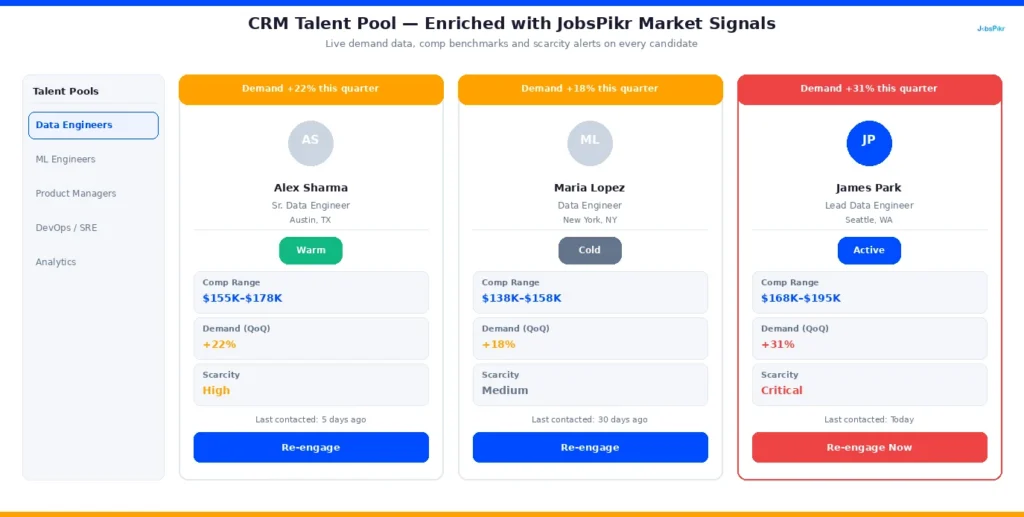
Step 4: Set up market change triggers
This is one of the most underused CRM automation opportunities in recruiting. Instead of only enriching records on a schedule, you can set up triggers that fire when JobsPikr data crosses a threshold you define.
For example, if demand for a particular role in a specific market increases by more than 20% week over week, that can trigger an automated alert or a task in your CRM prompting a sourcer to re-engage candidates in that talent pool. You are essentially building a sourcing workflow that responds to the market in real time rather than waiting for a hiring manager to raise a flag.
Step 5: Keep your enrichment data fresh
Stale market data inside a CRM is almost worse than no data, because it creates false confidence. Set up a scheduled refresh for your JobsPikr enrichment fields, weekly at minimum for active talent pools and monthly for dormant ones. Most middleware tools like MuleSoft, Boomi, or even a simple cron job on your server can handle this without any manual intervention.
According to LinkedIn’s Global Talent Trends report, 77% of talent acquisition leaders say that proactive sourcing is becoming more important than reactive hiring. A CRM enriched with live market data is the infrastructure that makes proactive sourcing actually work at scale.
Ready to Turn JobsPikr Into Your Recruiting Automation Engine?
Stop letting market intelligence sit in a dashboard nobody checks; bring it into the tools your team uses every day.
Real Recruiting Automation Use Cases That Show What This Integration Actually Does
Step-by-step instructions are useful. But what makes an integration worth building is what it enables once it is running. Here are three use cases that show what JobsPikr data looks like in practice inside your ATS and CRM workflows.
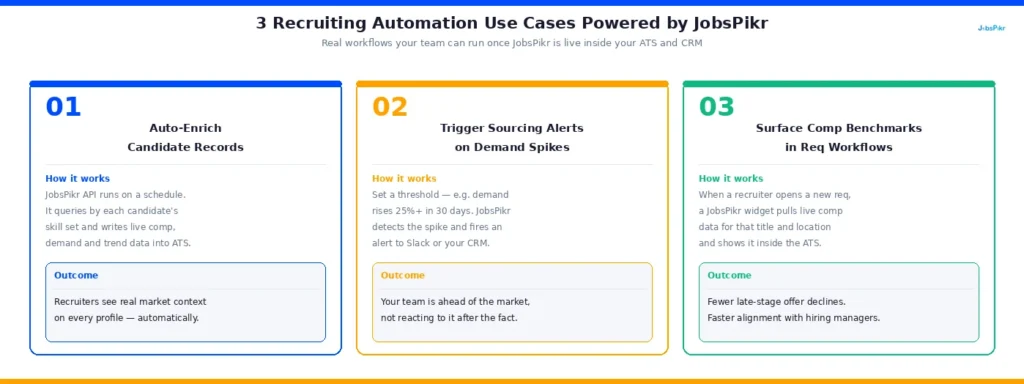
Use Case 1: Auto-Enriching Candidate Records with Live Market Context
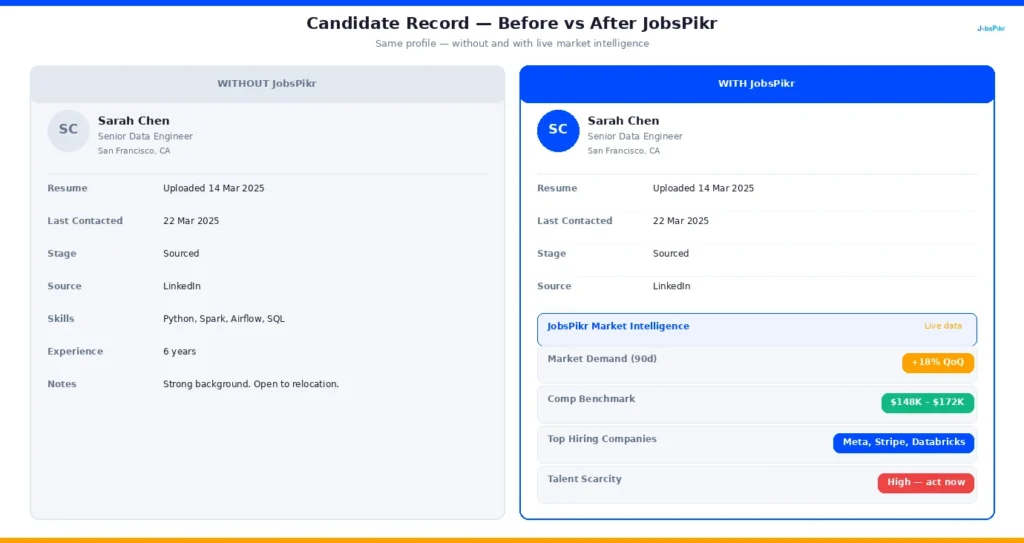
Picture a recruiter opening a candidate profile in Greenhouse for a Senior Data Engineer they sourced three months ago. Without JobsPikr, that profile has the basics: resume, notes, and last contacted date. With JobsPikr integrated, it also has a live market snapshot attached to that candidate’s skill set. Demand for Senior Data Engineers in their target market is up 18% quarter over quarter. The top companies hiring for that profile right now include three direct competitors. The median compensation range in their location has shifted upward by roughly $12,000 since the candidate was first added to the pipeline.
That context changes the conversation the recruiter has with that candidate, the offer they recommend to the hiring manager, and the urgency with which they move.
To set this up, you are running a scheduled JobsPikr API call using the candidate’s primary skills and target job title as query parameters, then writing the response into custom fields on the candidate record. The enrichment runs automatically on a cadence you define, so the data is always current without anyone having to manually update it.
Use Case 2: Triggering Sourcing Alerts When Role Demand Spikes
This one is particularly powerful for talent operations teams that are managing pipelines for hard-to-fill or recurring roles. The idea is to use JobsPikr’s trend data as a signal that kicks off a sourcing workflow before a hiring manager even submits a req.
Here is what that looks like in practice. You set a threshold in your integration logic: if job postings for a particular role in a particular market increase by more than 25% over a 30-day rolling window, fire an alert. That alert can go to a Slack channel, create a task in your CRM, or trigger an automated email to the relevant sourcer, prompting them to start warming up candidates in that talent pool.
The result is that your team is not reacting to hiring demand. They are getting ahead of it. By the time a req is officially opened, you already have a shortlist of candidates who have been re-engaged and are ready to move.
According to SHRM, organizations that use proactive sourcing strategies reduce their average time to fill by up to 20% compared to teams that rely purely on inbound applications. This kind of market-triggered automation is how you build that practice into your workflow systematically rather than depending on individual recruiter intuition.
Use Case 3: Surfacing Comp Benchmarks Inside Job Requisition Workflows
Compensation misalignment is one of the most common and most avoidable reasons a hire falls through late in the process. A candidate gets to the offer stage, the number comes in below market, and the whole pipeline collapses. It happens constantly, and most of the time it happens because the comp range was set at the start of the req process using data that was already outdated.
With JobsPikr integrated into your ATS, comp benchmarking becomes part of the req creation workflow rather than a separate research task someone may or may not complete. When a recruiter opens a new job requisition in Workday or iCIMS, a JobsPikr-powered widget surfaces the current compensation range for that role in that market, pulled from live job posting data. The hiring manager sees it before they sign off on the req. The recruiter sees it before they set candidate expectations.
To build this, you are calling JobsPikr’s salary and job detail endpoints at the point of req creation, using the job title and location fields as parameters, and rendering the response as a contextual data panel within the ATS interface. Most ATS platforms support this kind of embedded data display through their developer APIs or custom field configurations.
The downstream impact is fewer late-stage offer declines, faster alignment between hiring managers and recruiters, and a recruiting process that is working from real market data rather than last year’s compensation survey.
Before we get into the mistakes section, it is worth seeing how this all comes together visually. JobsPikr has put together a demo walkthrough of their talent strategy data in action, which gives you a good sense of what the enriched workflow looks like from the user side.
Common HR Tech Integration Mistakes and How to Avoid Them
Most integration projects do not fail because of bad intentions. They fail because of small decisions made early in the process that create big problems later. Here are the ones that come up most often when teams connect JobsPikr to their ATS or CRM, along with what to do instead.
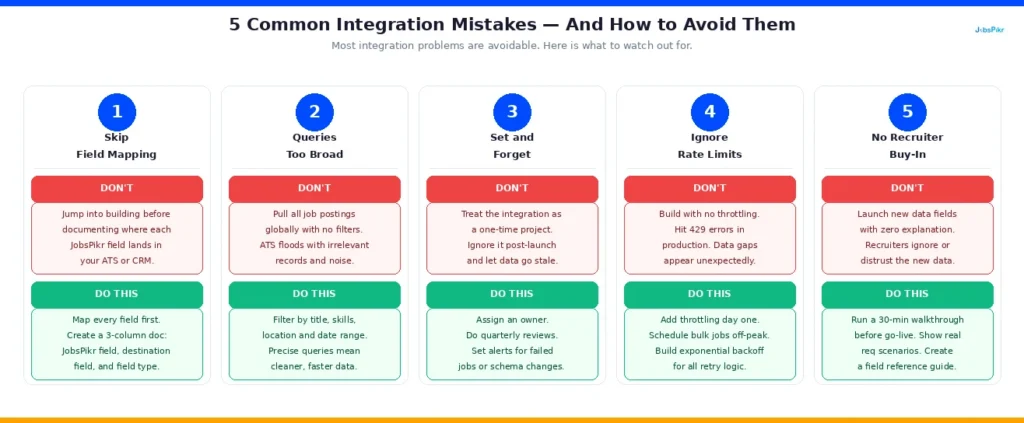
Mistake 1: Skipping the Field Mapping Exercise
This is the most common one. Teams get excited about the integration, get API access, and start pushing data before they have decided where it will live within their ATS or CRM. The result is job data landing in the wrong fields, cluttering up candidate records with information that does not make sense in context, or getting silently dropped because there is no field to receive it.
Before you write a single API call, sit down with your ATS or CRM admin and map every JobsPikr data field to a corresponding field in your destination system. Decide which fields are required, which are optional, and which you do not need at all. This exercise takes a few hours upfront and saves weeks of cleanup later.
Mistake 2: Not Scoping Your API Queries
JobsPikr tracks millions of job postings. If your API queries are too broad, you will pull in far more data than you need, hit your rate limits faster than expected, and end up with noisy, hard-to-use records inside your ATS. A query that simply asks for all Software Engineer postings globally is not useful. A query filtered by specific skills, seniority level, target geographies, and a defined date range is.
Take time to define exactly what data is relevant to each use case before you build the query. The more precise your inputs, the more useful your outputs.
Mistake 3: Treating the Integration as a One-Time Setup
An integration is not a project you complete and walk away from. Job market data changes constantly, and so do the APIs on both sides of your connection. Teams that set up the integration and stop paying attention to it often find themselves working from stale data months later without realizing it, because the enrichment fields stopped refreshing after an API version update or a schema change.
Assign someone ownership of the integration. Schedule a quarterly review of the data flowing through it. Set up monitoring alerts so you know immediately if a data pull fails or returns unexpected results.
Mistake 4: Ignoring Rate Limits Until They Become a Problem
JobsPikr’s API has rate limits, and hitting them mid-workflow disrupts your data pipeline and can cause gaps in your ATS or CRM records. The fix is simple but gets skipped often. Build request throttling into your integration logic from day one. If your use case requires high-frequency data pulls, talk to JobsPikr about your plan limits before you build, not after you start hitting errors in production.
Mistake 5: Not Getting Recruiter Buy-In Before You Launch
This one is less technical but just as important. A beautifully built integration that recruiters do not understand or trust does not get used. If the new market context fields appearing in candidate records are not explained to the team, they will be ignored at best and flagged as confusing clutter at worst.
Before you go live, run a short internal walkthrough with your recruiting team. Show them what the new data fields mean, how they should be used in candidate conversations, and why they are there. Adoption is what turns an integration into a business outcome. Without it, you have spent engineering time on something that sits unused.
According to Gartner, only 36% of HR technology investments deliver their expected business value, and poor adoption is one of the leading reasons. The technical work is only half the job.
Ready to Turn JobsPikr Into Your Recruiting Automation Engine?
Stop letting market intelligence sit in a dashboard nobody checks; bring it into the tools your team uses every day.
From Data Feed to Workforce Intelligence Infrastructure: What a Successful JobsPikr Integration Actually Looks Like
There is a version of JobsPikr that lives in a separate browser tab. Someone opens it before a quarterly planning meeting, pulls a report, pastes some numbers into a slide, and closes it again. That version of JobsPikr is useful in the same way a library is useful if you only visit it once a year.
Then there is the version where JobsPikr is woven into every req that gets opened, every candidate record that gets updated, and every sourcing workflow that gets triggered. That version is not a tool your team uses occasionally. It is the infrastructure your team runs on.
The difference between those two versions is not the data. The data is the same. The difference is integration.
How Live Job Data Transforms ATS and CRM Workflows
When JobsPikr data is live inside your ATS, recruiters stop making comp recommendations based on instinct and start making them based on what the market is actually paying right now. Hiring managers stop pushing back on salary ranges because the benchmark is sitting right there in the req workflow, sourced from real job postings rather than an annual survey that was already outdated when it was published.
When JobsPikr data is live inside your CRM, your sourcing team stops being reactive. They are not waiting for a req to open before they start building a pipeline. They are watching demand signals and warming up candidates before the hiring manager has even raised their hand. By the time the req lands, the shortlist is already half built.
These are not marginal improvements. According to McKinsey, organizations that embed real-time market intelligence into their talent acquisition workflows reduce cost per hire by up to 15% and improve quality of hire measurably over time. That is the enterprise ROI case for getting this integration right.
How JobsPikr Fits Into Your Existing HR Tech Stack
One of the most common concerns recruiting ops leaders raise about adding a new data source is that it means adding another tool, another login, another dashboard to check. The whole point of integrating JobsPikr into your ATS and CRM is that it does the opposite. It reduces the number of places your team needs to go to get the information they need, because the information comes to them inside the tools they are already using.
Your ATS does not get replaced. Your CRM does not get replaced. They get smarter. JobsPikr becomes the intelligence layer sitting underneath your existing HR tech stack, feeding it the market context it has always been missing.
Which Recruiting Ops Teams See the Biggest Impact
In practice, the teams that see the biggest impact from this integration share a few characteristics. They have a clear owner for the integration on both the technical and recruiting ops side. They have defined specific use cases before building, rather than integrating first and figuring out the use cases later. And they treat the integration as a living system that gets reviewed and refined over time, not a one-time implementation project.
If you are a TA ops leader, an HR tech product manager, or an ATS admin reading this, those are the conditions worth creating before you start building. The technical steps in this guide will get you connected. The organizational conditions are what make the connection count.
JobsPikr is not trying to replace the judgment of your recruiting team. It is trying to make sure that judgment is always working from the best available information. When that information is embedded into every workflow your team touches every day, recruiting automation stops being a buzzword and starts being how your operation actually runs.
Wrapping Up: Why Recruiting Automation Starts with the Right Integration
If there is one thing this guide is meant to leave you with, it is this: the value of job market data is not in having it. It is where it shows up when your team needs it most.
JobsPikr gives you access to real-time labor market intelligence that most recruiting teams would have killed for a decade ago. But that intelligence only earns its place in your HR tech budget when it is embedded into the workflows where hiring decisions actually get made. Inside your ATS, when a req gets opened. Inside your CRM, when a sourcer is deciding who to reach out to. Inside a comp conversation before it goes sideways at the offer stage.
The integration steps in this guide are not complicated once you understand the logic behind them. Authentication, field mapping, scoped queries, scheduled enrichment, and recruiter onboarding. Get those five things right, and you have built something that pays for itself in faster hires, better offers, and a sourcing team that is always one step ahead of the market.
The recruiting teams that will have a structural advantage over the next few years are not necessarily the ones with the biggest budgets or the most headcount. They are the ones whose tools are smarter. This integration is one of the clearest ways to get there.
Ready to Turn JobsPikr Into Your Recruiting Automation Engine?
Stop letting market intelligence sit in a dashboard nobody checks; bring it into the tools your team uses every day.
Frequently Asked Questions About Integrating JobsPikr for Recruiting Automation
What technical resources do I need to integrate JobsPikr into my ATS?
At a minimum, you need API access on both the JobsPikr side and your ATS side, and someone on your team who is comfortable working with REST APIs and JSON data. For simpler ATS platforms like Greenhouse or Lever, a single developer or a technically capable recruiting ops person can handle the integration. For more complex platforms like Workday, you will likely want a dedicated integration engineer or a middleware specialist familiar with tools like MuleSoft or Boomi. If your team does not have that resource in-house, most HR tech implementation partners can handle the build from the technical spec outlined in this guide.
How often does JobsPikr data update, and will my ATS always reflect current market conditions?
JobsPikr updates its job posting data in near real time, pulling from over 50,000 sources continuously. How current that data appears inside your ATS depends on how frequently you schedule your enrichment pulls. For active requisitions and high-priority talent pools, a daily refresh is generally sufficient to keep your market context accurate. For longer-term pipeline planning or passive talent pools, a weekly refresh works well. The important thing is to set a cadence deliberately and monitor it, rather than assuming the data is staying fresh without checking.
Can smaller recruiting teams without dedicated engineering resources still use this integration?
Yes, though the approach looks slightly different. Teams without in-house engineering support can use no-code or low-code middleware tools like Zapier, Make (formerly Integromat), or n8n to build the connection between JobsPikr’s API and their ATS or CRM without writing custom code. The trade-off is that these tools offer less flexibility than a fully custom integration, and they may not support every use case described in this guide. But for teams that want to start pulling JobsPikr data into their workflows quickly, they are a perfectly valid starting point that can be upgraded later as needs grow.
How is integrating JobsPikr different from just using the JobsPikr dashboard directly?
The dashboard is useful for ad hoc research and high-level market exploration. The integration is useful for making that research automatic, contextual, and available to your entire recruiting team without anyone having to go looking for it. When JobsPikr data lives in your ATS, it shows up in the moment a recruiter needs it, attached to the specific req or candidate they are working on. When it lives only in the dashboard, it gets checked occasionally and acted on rarely. For recruiting teams operating at any kind of scale, the integration is what turns JobsPikr from a research tool into a workforce intelligence infrastructure.
What is the best way to measure the ROI of a JobsPikr ATS or CRM integration?
Start by establishing your baseline metrics before the integration goes live. The numbers you want to track are time to fill, cost per hire, offer acceptance rate, and sourcing efficiency (measured as the ratio of candidates contacted to candidates who reach the interview stage). After the integration has been running for 60 to 90 days, compare those numbers against your baseline. The clearest ROI signals tend to show up first in offer acceptance rates, because comp alignment improves almost immediately when recruiters are working from live market data. Time to fill improvements tend to follow as the sourcing alert and pipeline enrichment use cases mature. According to SHRM, even a 10% reduction in time to fill translates to meaningful cost savings when calculated against the average cost per hire of $4,700 across US organizations.