- **TL;DR**
- What Are Workforce Metrics and Analytics?
- Why Workforce Metrics and Analytics Matter in 2025
- Turn HR Dashboards Into Workforce Intelligence
- What Are the Most Important Workforce Metrics to Track?
- How is Workforce Analytics Different from Old-School HR Reporting?
- What Types of Workforce Analytics Do Companies Use?
- How do You Build a Workforce Analytics Framework That Works?
- What Role do External Labor Market Insights Play in Workforce Analytics?
- How Does Workforce Intelligence Look in Practice?
- What Makes Implementing Workforce Analytics Harder Than It Looks?
- Where is Workforce Analytics Heading Next?
- From Reporting to Readiness
- Turn HR Dashboards Into Workforce Intelligence
- FAQs:
**TL;DR**
Dashboards tell you how many people left. Analytics tell you why they left and what you can do about it. That’s the real difference between tracking workforce metrics and actually using workforce analytics.
It’s one thing to know your attrition rate went up 12%. It’s another thing to know that there was a spike right after competitors started offering remote-first roles with higher pay. That shift only shows up when you layer external labor market analytics, real hiring data, skill demand trends, and pay benchmarks on top of your internal HR reports.
When you do, patterns click into place. Hiring bottlenecks make sense. Retention plans stop feeling like guesswork. Data stops being a mirror and starts being a map.
What Are Workforce Metrics and Analytics?

Image Source: CHRMP
Most HR teams live inside a wall of numbers: headcount, turnover rate, time-to-fill, training hours.
That’s workforce metrics: the raw, descriptive layer of what’s happening in your organization right now.
But knowing what’s happening isn’t enough anymore. You need to know why. That’s where workforce analytics comes in. It’s the part that connects those numbers to behavior, to external reality, and to business outcomes.
Here’s an easy way to think about it:
If metrics say, “Our sales team’s attrition is 18%,” analytics says, “It’s 18% because competitor X is hiring aggressively in our region for the same roles at a 20% salary premium.”
That second half, the why, is what turns data into workforce intelligence.
And as AI and hybrid work reshape how and where people work, that context matters more than ever. According to Deloitte’s 2024 Human Capital Trends, companies using workforce analytics effectively are twice as likely to exceed their financial targets compared to those relying on metrics alone.
The gap between those two groups? It’s not technology.
Its interpretation. It’s knowing how to connect what’s inside your HR system with what’s happening out there in the job market.
That’s where tools like JobsPikr come in, linking your internal HR signals to external labor market analytics so you can see the full picture of your workforce in motion.
Why Workforce Metrics and Analytics Matter in 2025
HR used to be about gut feel. You hired based on experience, promoted based on tenure, and worried about attrition after it happened. That worked when markets moved slowly and roles didn’t evolve every six months.
But now? Everything moves faster. New job titles appear overnight. Skills that mattered last year get replaced by ones no one was trained for. And employees have options; remote work widened the talent pool for everyone.
That’s why workforce metrics and analytics aren’t a “nice to have” anymore. They’re the difference between reacting and anticipating.
Picture this: your data shows a 10% drop in applications for mid-level data analyst roles. Not alarming, right? But when you look at external job market analytics, real-time postings, salary changes, and competitor hiring, you notice something: demand for the same roles spiked 35% in your region last month. That’s not a fluke; it’s a signal.
That’s workforce intelligence at work, using data from inside your systems and the wider labor market to answer the bigger question: “Are we still competitive out there?”
And this is the year that question decides retention, culture, and strategy.
According to PwC’s Global Workforce Hopes & Fears Survey 2023, 26% of employees say they’re likely to change jobs in the next 12 months—up from 19% the prior year, largely for better pay, flexibility, or growth. The organizations that see those shifts coming early, through analytics, don’t scramble to backfill; they prepare to reskill.
Because workforce analytics doesn’t just explain the past. It gives you a window into the future of your workforce — who’s at risk, which skills you’re missing, and where your next hiring challenge will hit.
That’s the kind of foresight HR leaders need in 2025. And it’s built on one simple idea: Stop guessing. Start measuring what matters.
Turn HR Dashboards Into Workforce Intelligence
See how JobsPikr turns labor-market data into real-time HR strategy.
What Are the Most Important Workforce Metrics to Track?

Image Source: AIHR
Every HR leader has their favorite dashboard, maybe it’s a heat map of turnover, a hiring funnel. But underneath all those charts, the truth is simple: only a handful of metrics actually move the needle.
Let’s break them down.
Productivity and Performance Metrics
You can’t manage what you can’t measure. Yet performance isn’t about counting hours logged or projects closed, it’s about impact per person.
Metrics like revenue per employee, goal-completion rate, or project cycle time show how efficiently your teams turn effort into results. When these metrics dip, analytics helps you ask the better question: Is it skill, structure, or morale?
Pairing internal metrics with external job market analytics adds another layer. If the market suddenly demands new data-analysis skills, a drop in productivity might not mean poor performance; it could signal an emerging skill gap.
Retention and Turnover Metrics
Turnover rate is the heartbeat of workforce health. But it’s a lagging indicator — by the time you see a spike, the exits have already happened.
Workforce analytics flips that around. It looks for patterns that predict attrition: changes in promotion velocity, tenure by role, or even salary compression compared with real-time external benchmarks.
When external labor market analytics show higher pay for your key roles, you can see which teams are most at risk before the resignations start.
Recruitment and Hiring Metrics
Everyone measures time-to-hire. Fewer measure time-to-effectiveness, how long it takes new hires to reach full productivity.
That’s the more revealing number.
JobsPikr’s job market analysis data helps talent teams understand how their job descriptions, salary ranges, and required skills stack up against live postings across competitors. You can see in black and white whether your hiring expectations match the market’s reality.
Diversity and Inclusion Metrics
Representation ratios are only step one. True workforce analysis means looking at progression, pay equity, and retention within each demographic group.
Analytics can expose invisible walls, for instance, if women make up 45 % of entry-level hires but only 12 % of senior roles. When you add external data, you can also see whether your industry peers are facing the same gaps or moving faster toward balance.
Learning and Development Metrics
Training hours don’t prove learning; skill gain does.
Tracking metrics like post-training performance, internal mobility after learning programs, or certification completion shows whether L&D investments actually close capability gaps.
Overlay that with real-time market signals, which new skills are appearing most often in job postings, and you can steer your training budget toward what’s becoming valuable next quarter, not last year.
How is Workforce Analytics Different from Old-School HR Reporting?
The short version: HR reporting counts things. Workforce analytics explains them.
Old dashboards were mirrors. They told you how many people left, how many joined, how many got promoted. You could look at the reflection and say, “Interesting,” but not much more.
Analytics is the flashlight. It shows what’s hiding behind those numbers—why certain teams burn out faster, why time-to-fill keeps stretching, or why one region consistently beats its hiring targets.
In reporting mode, HR says:
“Turnover rose to 17 percent last quarter.”
In analytics mode, HR says:
“Turnover rose because our competitors raised pay bands by 10 percent for the same roles, and internal mobility slowed by half.”
That’s the difference between observation and understanding.
The old reports were descriptive. They answered what happened. Analytics is diagnostic and predictive; it asks why and what happens next.
When you connect your HRIS with live labor-market analytics, data on real-time hiring trends, salary benchmarks, and skills demand, you stop guessing about context. You know exactly where the market is pulling talent and how to respond.
Put simply: reports keep score. Analytics changes the play.
What Types of Workforce Analytics Do Companies Use?
When people say “we’re doing workforce analytics,” it can mean anything from tracking basic KPIs to building predictive models. The term gets thrown around so much that it’s easy to lose the thread. In practice, most teams move through four levels in workforce analytics. Each one builds on the last.

Image Source: AIHR
1. Descriptive analytics – what happened?
This is where every HR dashboard starts.
Headcount, attrition, time-to-fill, diversity ratios, training hours, it’s the record of what already happened. It’s useful for spotting patterns, but it stops at observation.
Think of descriptive analytics as your organization’s historical ledger. You can tell how many people left, or which teams hired fastest, but not why any of it occurred.
2. Diagnostic analytics – why did it happen?
Now we start asking questions.
When turnover spikes, diagnostic analytics looks for correlations: manager changes, pay compression, promotion freezes, or workload increases.
The value here comes from context. If external job-market analytics show your competitors just raised salaries for the same job family, the “why” becomes pretty clear. You’re no longer guessing; you’re connecting dots between internal behavior and market movement.
3. Predictive analytics – what’s likely to happen next?
Once you have clean data and a sense of causation, you can start forecasting.
Predictive models look for early signs of risk: declining engagement before resignations, delayed project timelines before burnout, or new job postings in your region that could poach key talent.
It’s not magic, it’s probabilities built from patterns. But the result feels close to foresight.
Companies using predictive workforce analytics often spot retention risks 2–3 months earlier than traditional HR review cycles.
4. Prescriptive analytics – what should we do about it?
This is the stage where analytics stops being reactive and starts guiding decisions.
Prescriptive analytics takes predictions and runs scenarios:
If we lift pay by 5 %, what happens to attrition?
If we move training spend from soft skills to cloud skills, how does that affect promotion velocity next year?
It’s a simulation, not speculation, and it’s where most organizations want to end up.
Tools like JobsPikr feed these models with live external data, ensuring your decisions aren’t based solely on last quarter’s view of the market.
How do You Build a Workforce Analytics Framework That Works?

Image Source: slideteam
Every HR team says they want to be data-driven. The harder part is turning that into a system—something that doesn’t live in one analyst’s spreadsheet but feeds decision-making across the company.
A workable framework usually follows a simple rhythm: define, collect, connect, and communicate.
1. Define what business problem you’re solving
Before pulling any data, write down the real question.
- “Why are engineers leaving?” is a question.
- “So we can prove we need a bigger budget” is not.
Good analytics starts with clarity. If your goal is retention, decide what “healthy” looks like; maybe it’s 12 months of average tenure or a 10 % drop in regrettable loss. The right metric depends on the intent.
2. Identify and clean your data sources
Most of what you need is already hiding in your systems: HRIS, ATS, performance tools, and learning platforms.
Add a second layer, external labor-market analytics, to see what’s happening outside your walls. That’s the differentiator.
A clean dataset from your internal systems, plus a live market feed from a tool like JobsPikr, gives you both the internal view (who you have) and the external context (who you’re competing with).
3. Standardize the metrics
Different departments count things differently. One team tracks “time-to-hire” from job post; another starts at approval. When that happens, you can’t compare or trend over time.
Create shared definitions. Document them. Workforce analytics loses power the minute data becomes debatable.
4. Connect the dots (internal + external)
Internal HR data tells you what’s happening. External job-market analytics tells you why it matters.
Example: internal data shows slower promotion rates for analysts. External data shows a surge in job postings for senior analysts with Python. Combine the two, and you realize your analysts aren’t stuck; they’re getting poached.
That’s the real benefit of workforce metrics and analytics: the ability to see your people in the context of the wider labor economy.
5. Communicate insights in plain language
Charts don’t move executives; stories do. Translate data into implications:
- “Attrition rose 8 %” becomes
- “We’re losing one in twelve mid-career engineers because the market now pays ₹3 L more.”
That’s the sentence that gets budgets approved. Analytics isn’t finished until the people with decision-making power can act on it.
6. Build feedback loops
Don’t let reports die in inboxes. Run a review every quarter where HR, Finance, and Ops look at what changed because of analytics.
- Did turnover predictions match reality?
- Did training programs move the skill metrics?
If not, adjust inputs and try again. The framework is a cycle, not a one-time project.
What Role do External Labor Market Insights Play in Workforce Analytics?
You can’t understand your workforce in isolation anymore. The market is the background noise that shapes every decision your employees make, what skills they learn, which offers they entertain, and even how long they stay.
Most HR teams focus on internal dashboards: headcount, pay, performance, engagement. Useful, yes, but it’s like driving with one eye closed. Without an external labor-market context, those numbers can trick you into thinking the issue is internal when it’s really environmental.
Here’s what external data adds to the mix.
It shows what “normal” actually looks like
Say your turnover jumped from 14 % to 18 %. That feels bad—until you realize every company in your region hiring the same roles is seeing 20 %+.
That’s what labor-market analytics gives you: the benchmark that tells you whether a spike is a problem or a pattern.
According to LinkedIn’s Global Talent Trends 2024 report, 73 % of HR leaders use external labor data to benchmark compensation and hiring competitiveness. The reason is simple—internal targets without external baselines are guesswork.
It spots demand before your people do
Markets broadcast signals if you know where to look.
When the number of job postings mentioning “GenAI Engineer” doubles in your city, your developers will notice, through recruiters, peers, or pay transparency sites, long before you do.
Tracking those signals early through job-market analytics helps you see which roles will heat up, so you can plan retention or reskilling before the pull starts.
It makes skills planning real
Internal learning data tells you who’s completing courses. External data tells you whether those skills are still relevant.
If postings for Power BI drop while Python + SQL combos surge, you know where to steer your next certification budget.
That’s how workforce intelligence works best, when inside skills data meets outside demand data.
It keeps pay conversations grounded
Pay perception drives more exits than pay itself. With market benchmarks from tools like JobsPikr, you can show managers and employees what current salary ranges actually look like. The conversation moves from emotion to evidence.
Instead of “I heard competitors pay more,” it becomes “Here’s what the market data shows for this role and level.”
It helps you defend your strategy
Boards, CFOs, and CHROs don’t always speak the same language. Market data is the translator.
When you can show, with evidence, that demand for cybersecurity analysts rose 60 % in your region, that’s not just an HR data point; it’s a business case for retention bonuses or pipeline partnerships.
How Does Workforce Intelligence Look in Practice?

Image Source: phenom
Most people get workforce analytics in theory, but struggle to picture what it looks like in action.
So let’s take a real-world scenario — the kind of pattern HR leaders see every quarter and usually misread at first.
The situation
A mid-size tech company starts noticing a quiet turnover among its data team. Nothing dramatic — just a few engineers leaving every month. Exit interviews mention “better opportunities” and “faster-moving projects elsewhere.” HR adds a retention bonus and moves on.
Three months later, the analytics team is short-staffed, deliverables are late, and recruitment pipelines are empty. The problem wasn’t money. It was timing.
The insight
When the HR analytics team looked beyond internal metrics and pulled in external labor-market analytics from JobsPikr, the picture changed completely.
Job postings for “AI Engineer” and “Machine Learning Engineer” in their region had jumped nearly 90 % year-over-year (LinkedIn Economic Graph, 2024).
The same companies were targeting mid-level data engineers, the exact profile this firm was losing.
That was the missing context: the market had shifted under their feet.
The action
Once they saw it, the company didn’t just raise pay.
They launched a six-month reskilling sprint, upskilling internal data engineers on AI frameworks and publicizing those projects internally.
Recruitment messaging also changed: job descriptions now reflected the newer skill stack candidates wanted to see.
Within a quarter, attrition stabilized. By the next hiring cycle, the company had filled roles 25 % faster because the job ads matched live market language, not last year’s.
The takeaway
That’s workforce intelligence in motion:
- Internal HR data spotted a symptom (attrition).
- External market data explained the cause (skills migration).
- Analytics turned both into a plan (reskill + reposition).
No dashboards alone could’ve told that story. You need both sides of the glass — what’s happening inside and what’s happening out there.
What Makes Implementing Workforce Analytics Harder Than It Looks?
Everyone loves the idea of being data-driven. Until you start doing it. That’s when the mess shows up: inconsistent data, missing context, skeptical managers, and “we’ve always done it this way” attitudes.
Workforce analytics isn’t difficult because the math is hard. It’s difficult because organizations are human. Here are the most common roadblocks teams run into, and what separates the ones who push through from the ones who stall.
1. Incomplete or disconnected data
Half the battle is getting systems to talk to each other.
Recruiting uses one platform, HRIS another, learning a third, and none of them speak the same language. You end up with five “sources of truth” that don’t add up.
Analytics depends on clean, structured data. Without it, even the smartest dashboard is just a fancy mirror showing inconsistencies.
The fix is boring but necessary: audit your inputs, standardize fields, and align how metrics are defined across tools.
2. Skills gap inside HR
Data literacy isn’t optional anymore. Yet most HR teams were never trained for it.
Understanding workforce metrics and analytics means reading patterns, not just reports. It’s being able to say, “Attrition rose, but the risk index shows it’s concentrated in two job families with market pressure.”
Companies bridging this skills gap often pair HR pros with data analysts, HR brings context, analysts bring structure. That’s where the insight lives.
3. Overreliance on internal data
A big one. Internal dashboards feel comfortable because they’re yours. But they only show what’s happening inside the bubble.
Without labor market analytics, you’re missing the cause-and-effect layer that explains those internal changes.
It’s like watching a weather app that only measures indoor temperature, accurate, but useless for planning.
External data grounds your decisions in reality: what skills are heating up, what pay bands are shifting, what demand looks like regionally.
4. Privacy and compliance pressure
More data means more responsibility. Workforce analytics must walk the line between insight and intrusion.
That means anonymizing sensitive data, respecting employee consent, and using insights for improvement, not surveillance.
Transparent communication helps. When employees understand that analytics is used to improve development opportunities or pay fairness, not to monitor behavior, adoption rises quickly.
5. Leadership patience
Analytics takes time to pay off. The first few quarters can feel like extra work with no obvious ROI. That’s when sponsorship wobbles.
The truth: early cycles are about building trust in the data. Once patterns start proving accurate, predicting turnover, and validating pay moves, leaders stop asking for ROI. They start asking for more dashboards.
The hardest part of analytics isn’t data collection; it’s culture change. Organizations that win at this make analytics part of the conversation, not a quarterly report. They ask questions with it.
They act on it. And they treat external market signals as a living feed, not a one-time download.
Where is Workforce Analytics Heading Next?
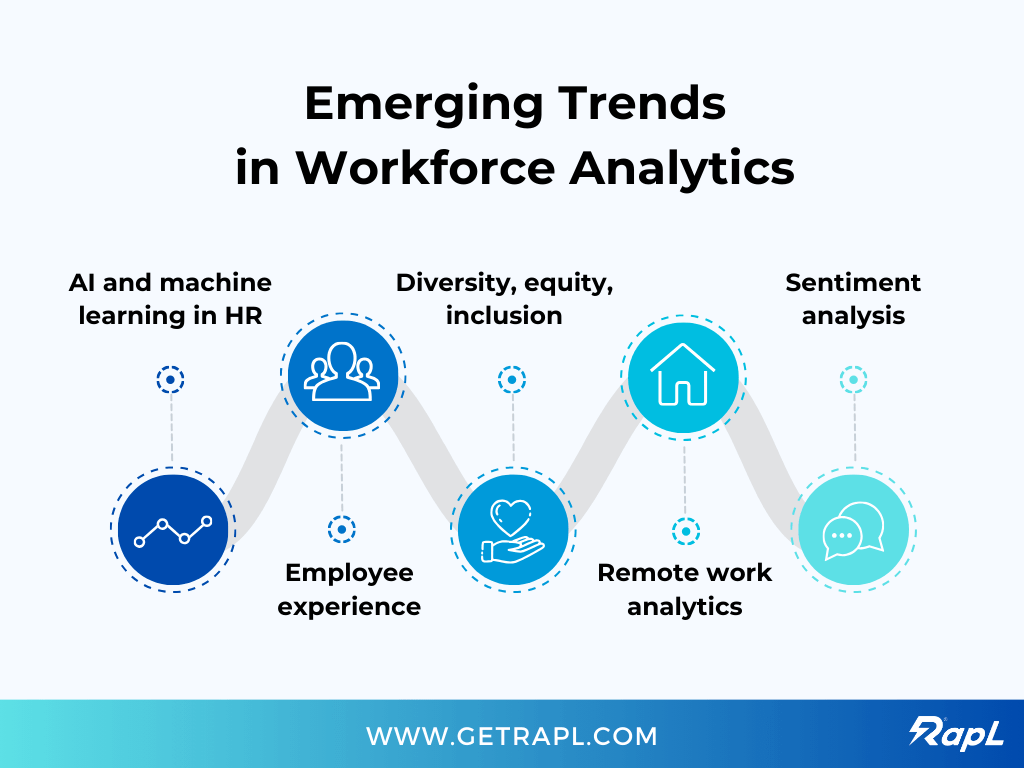
Image Source: getrapl
The short answer: it’s getting faster, broader, and more personal.
The long answer? HR is finally catching up to how business strategy already works—using live data to make decisions in real time rather than reporting on what happened last quarter.
For years, workforce analytics has been about dashboards and hindsight. Now it’s moving toward prediction, simulation, and automation.
1. Real-time decision systems
The future isn’t another report. It’s an alert.
Imagine your analytics stack pinging you when attrition risk for a specific role jumps because external job-market analytics show new competitors hiring aggressively in your city.
That’s where things are headed, from monthly reporting to continuous sensing.
AI models trained on internal HR data and external signals can already flag early-warning trends weeks before they show up in turnover numbers. Companies that build these feedback loops won’t just react faster; they’ll hire, reskill, and budget smarter.
2. Skills-based organizations
Job titles are losing relevance. Skills are taking over.
In the next wave of workforce intelligence, companies will map every role by the skills it contains and compare those skills to live market demand.
That shift will redefine workforce planning. Instead of asking “How many developers do we need?” you’ll ask “Which skills are fading and which are emerging?”
Analytics platforms that can blend employee data with labor-market analytics, like JobsPikr’s real-time skill taxonomy, will lead this transition.
3. Integration with business forecasting
Workforce analytics will stop being a separate HR function and start feeding directly into finance and strategy.
Headcount models will sync with revenue forecasts, hiring plans will adjust automatically to pipeline shifts, and scenario planning will become standard.
The goal is simple: no more HR caught off guard when business priorities change. Workforce data will become a core input for every strategic decision.
4. Responsible AI in people decisions
AI will play a growing role in workforce analytics, but it brings ethical responsibility with it.
Bias, transparency, and explainability will define which tools survive.
Regulations like the EU AI Act are already pushing vendors to make HR algorithms auditable and fair.
The companies that win won’t just have smarter data—they’ll have safer, more trustworthy systems.
5. The analytics-to-action bridge
Analytics alone isn’t the finish line. The future belongs to systems that act on insights automatically, suggesting internal transfers before exit interviews, triggering training for roles facing automation, and adjusting compensation based on live pay data.
The distance between insight and action is shrinking fast. And the companies closing that gap first will define what “data-driven HR” really means in practice.
From Reporting to Readiness
Workforce metrics tell you what happened last quarter. Workforce analytics tells you what’s coming next and why.
When you blend internal HR data with real-time labor-market analytics, you stop reacting to change and start anticipating it. That’s the real shift: from reporting the past to designing the future.
The companies that build this muscle now: clean data, clear frameworks, and constant external context, won’t just have better insights. They’ll have a workforce that’s ready for whatever comes next.
Turn HR Dashboards Into Workforce Intelligence
See how JobsPikr turns labor-market data into real-time HR strategy.
FAQs:
1. What is the workforce metric?
A workforce metric is a simple, trackable number about your people or jobs — think turnover rate, offer-accept rate, time-to-hire, internal mobility, pay gap. It’s the reading on the gauge. Useful on its own, but it only tells you that something moved, not why.
2. What is workforce analytics?
It’s the part where you stop listing numbers and start explaining them. Workforce analytics connects changes in those metrics to causes — market pay shifts, manager changes, career path bottlenecks, skill gaps — and then points to actions you can take.
3. What is HR metrics and workforce analysis?
HR metrics are the raw counts from your systems (ATS, HRIS, L&D). Workforce analysis is the interpretation layer that ties those counts to business outcomes and market reality. Together they answer: what happened, why it happened, and what it means for results.
4. What is workforce metrics and analytics?
It’s the full loop: measure, understand, act. Metrics measure what’s happening; analytics explains it and recommends a move (adjust pay bands, rewrite JDs, fund a skills program, change staffing). If you only have metrics, you’re reporting. With analytics, you’re steering.
5. How do I start with workforce metrics and analytics?
Pick one business problem (for example, regrettable attrition in engineering). Standardize three to five metrics, pull six to twelve months of history, and add current market pay/skills data for those roles. Share one plain-English finding and one decision you’ll make because of it. Then iterate.
6 Which data sources matter most for workforce intelligence?
Internally: HRIS (headcount, pay), ATS (pipeline, time-to-hire), performance/OKRs, and L&D/certifications. Externally: real-time job postings, salary ranges, and skill trends for your roles and locations (JobsPikr provides this layer). The value comes from connecting the two, not choosing one.